Qarett, by EMRALD
Weigh every AI work stint and see where the day really went.
Time and weigh your AI work. No timer to run, just one short receipt at the end.
Connect Qarett
Before you start: go to app.effortmastery.com and create a free account to use Qarett. You'll sign in with it the first time you connect.
hermes mcp add qarett --url https://mcp.qarett.com/mcp --auth oauthhermes mcp login qarettRun them one after the other. A browser opens to the Qarett sign-in page.
Open Customize, then Connectors, then Add custom connector.
Name it Qarett and paste this address:
https://mcp.qarett.com/mcpChoose Continue. If asked, pick Sign in now and Register automatically. When Claude prompts you to finish, choose Connect and sign in.
Add a remote MCP server with this address and choose sign-in (OAuth):
https://mcp.qarett.com/mcpThen tell your AI you're starting work, or say "list my Qarett projects".
Qarett is free to use and works with every version of EMRALD.
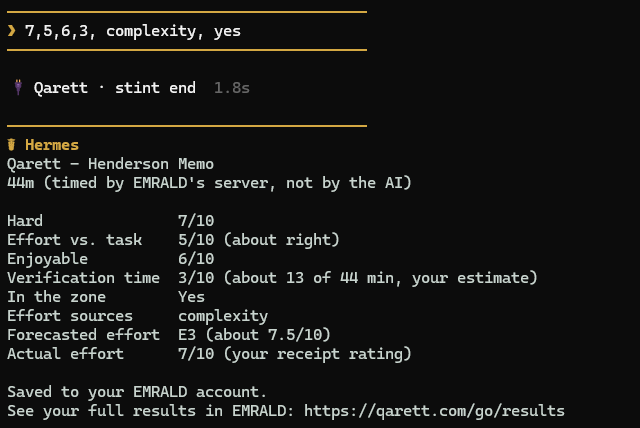
⚖️ Qarett · Henderson memo
44m · timed by EMRALD's server, not by the AI
| Hard | 7/10 |
|---|---|
| Effort vs. task | 5/10 · about right |
| Enjoyable | 6/10 |
| Verification time | 3/10 · about 13 of 44 min (your estimate) |
| In the zone | Yes |
| Effort sources | complexity |
| Forecasted effort | E3 (about 7.5/10) |
| Actual effort | 7/10 (your receipt rating) |
Saved to your EMRALD account
An example receipt card.
Three steps
Your AI chat hides two costs: hours that slip by and the time spent checking the AI's work. Qarett weighs both in three steps.
- 1
Work as usual.
Your AI starts and ends a stint when real work does, and Qarett's server stamps the times, so there is no timer to run.
- 2
Fill out a ten-second receipt.
How hard it was, whether your effort fit the task, how pleasant it was, plus optional extras like how much went to verifying the AI's work.
- 3
See your results in your EMRALD account.
Every stint adds to a record compared only to your own past.
Where the day went
Time blindness makes it hard to say how long a stretch of work took or how heavy it was. Qarett gives each AI stint a server-stamped clock and your own 1 to 10 ratings of how hard it was. Your record is compared only to your own past.
No stopwatches to push
Your AI notices when real work begins and ends, and Qarett's server stamps both times. You never have to press anything. The ratings are yours, in your own words.
The verification tax, recorded
The verification tax is the hidden cost of verifying AI output. Qarett records it with Verification share (D21), a free metric that comes with Qarett: your own estimate of how much of a stint went to checking the AI's work instead of actually producing. It appears in the EMRALD web app's Data Center, marked with a Qarett chip. The base EMRALD receipt does not ask it.
What the receipt asks
Three ratings, each 1 to 10:
Optional extras, when you want them: how much of the stint went to checking the AI's work, whether you were in the zone, what made the work effortful, any unexpected complications on a multi-day project, and any notes you want to include.
Try it with your own work
Paste these into your AI app.
Consultant
- Start
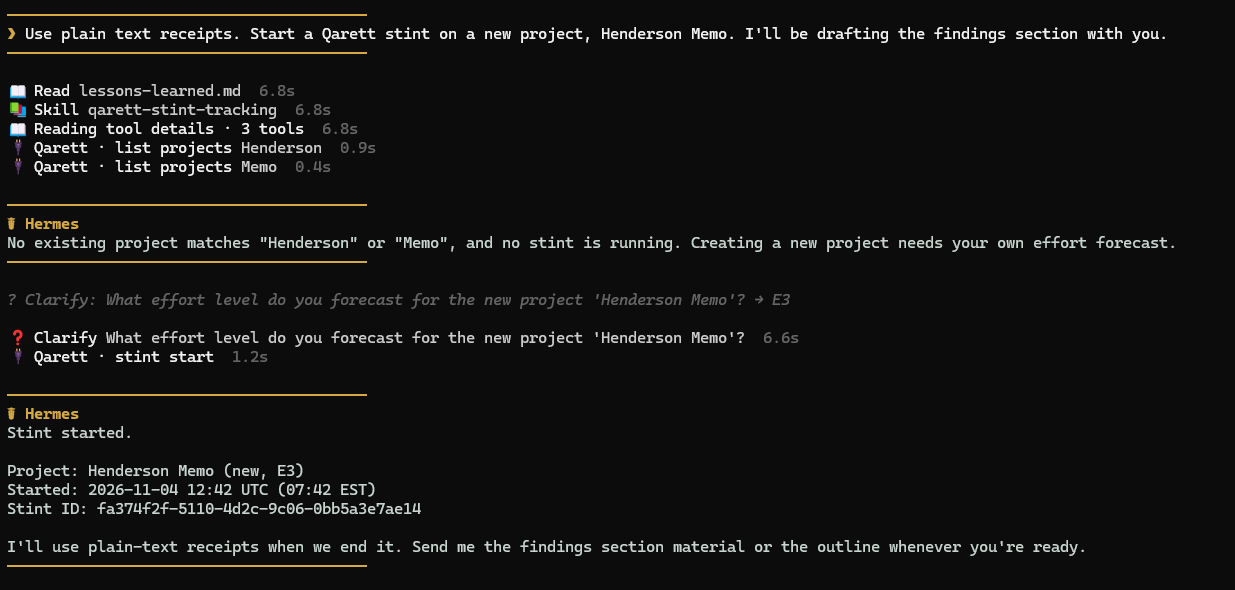
Start a Qarett stint on my Henderson memo project. I'm drafting the findings section with you.
- Work
Tighten the second paragraph and check the numbers against the appendix.
- End
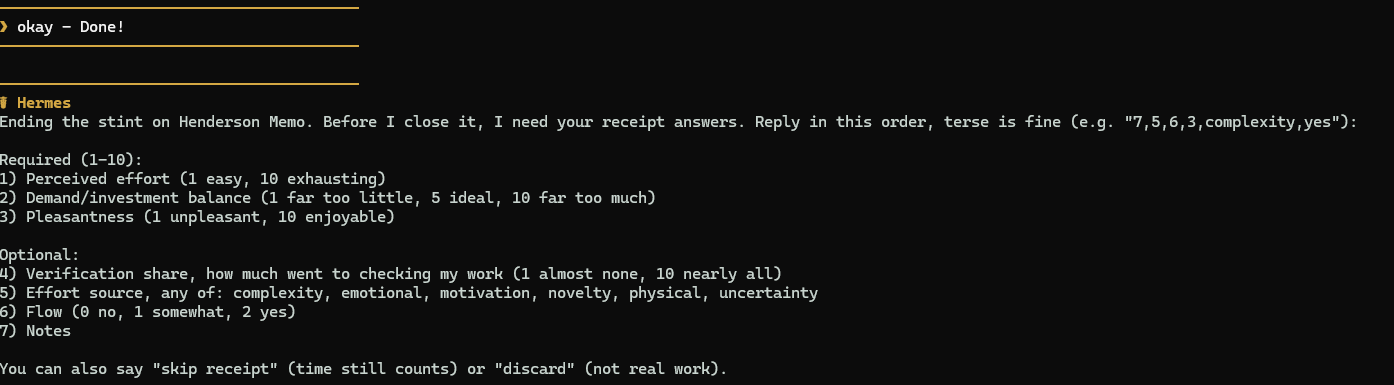
Done. 7, 5, 6, 3, complexity, yes.
(hard, effort fit, pleasant, how much went to checking, what made it effortful, in the zone; about ten seconds to type)
Writer
- Start
Start a Qarett stint on the newsletter project. I'm revising the long essay with you today.
- Work
Cut the middle section by a third and keep the argument.
- End
Wrapping up. 5, 6, 9, 1, novelty, yes.
Finance/ops lead
- Start
Start a Qarett stint on the Q3 reconciliation project. We're matching invoices to the ledger export.
- Work
Flag every invoice over 5,000 that has no matching ledger line.
- End
That's it. 8, 5, 3, 7, uncertainty, somewhat.
What it looks like
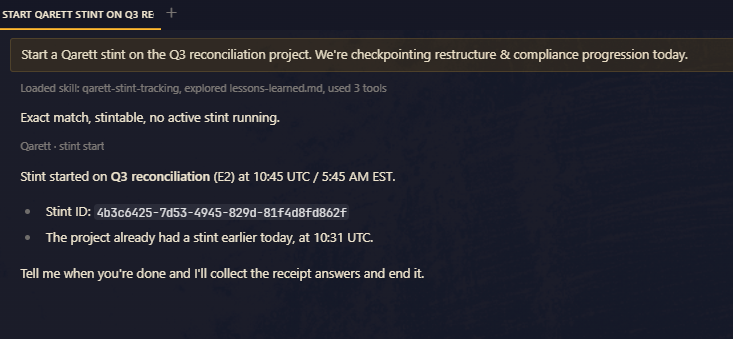
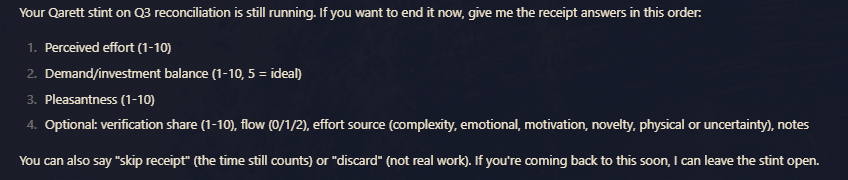
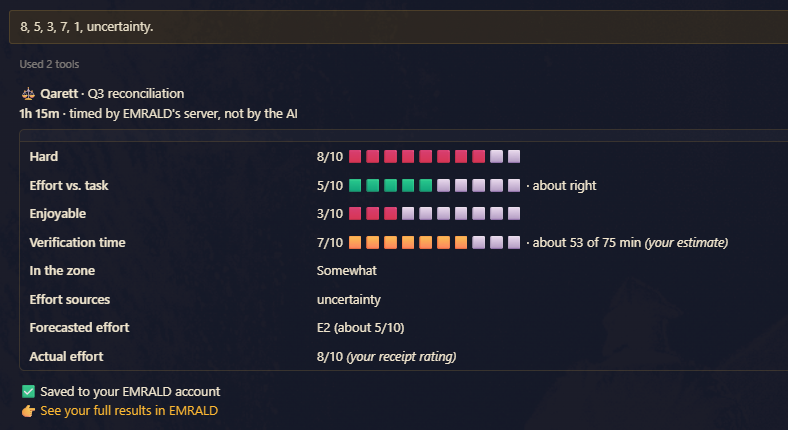
In a terminal, the same card comes as plain text.
Questions
Is Qarett free?
Yes. Qarett is free to use and works with every version of EMRALD. Verification share (D21), the one metric Qarett adds, comes with it.
Do I need an EMRALD account?
Yes, a free one. Your stints and receipts save to it, and you sign in with your EMRALD email and password the first time you connect.
What is Verification share (D21)?
Verification share (D21), free, from Qarett, is your own estimate of how much of a stint went to checking the AI's work. It appears in the EMRALD web app's Data Center with a Qarett chip, and the base EMRALD receipt does not ask it.
Which AI apps work?
Claude (as a custom connector) and Hermes. Any other app that supports remote MCP servers with sign-in can use the same address.
How do I turn it off?
Open the Integrations page in your EMRALD account and choose Revoke. The connection also lapses after 90 days without use.
Setup for every app and the technical details are in the docs.
Weigh your next stint
Connect Qarett to your AI app in a few minutes, then tell it you're starting work.
Connect Qarett